
Speech To Text Conversion using Python
Posted on by Sumit KumarHello Reader,
In this blog, we will learn how to convert Speech to Text using Python.

Follow below Steps:-
- Download and install Anaconda (for python and jupyter).
- Install SpeechRecognition.
Open Anaconda prompt and install SpeechRecognition.
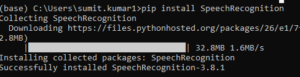
3. Install pyaudio.
pip install pyaudio
If you are getting below error while installing pyaudio:-

Then download pyaudio binary and install.

Once SpeechRecognition and PyAudio has Installed, Open Jupyter and Write below code.
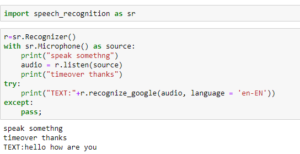
In the above example I said “hello how are you” and code converted that into text which you can see in output.
If you want text output in Hindi , change language to “hi-IN”.
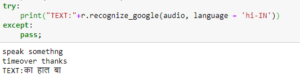
I hope this will help.
Thanks 🙂





Leave a Reply